Property context is scattered
Staff check separate department records and outside sources. Each extra search takes time away from response and program work.
When property records, programs, and departmental work live in different places, even a simple question can take days to answer. SEIN helps governments connect what they know, decide what to do, and follow it through.

Leadership needs timely answers. Program managers need to know where an application stands. Departments need a shared record of what happened and who owns the next step.
“Which properties have open code issues, unpaid taxes, and an active housing application?”
Answering this may mean checking separate records and calling multiple departments. The goal is to bring the relevant context together around the property.
Staff check separate department records and outside sources. Each extra search takes time away from response and program work.
Responsibilities and decisions live in inboxes or individual memory. Changes in staff can leave critical context behind.
Leaders assemble status updates manually, making it harder to see missing requirements and project exceptions early.
When information is spread across systems and individual staff members, handoffs become fragile. A shared operating record can help teams retain context as people change roles and programs grow.
Keep property history, decisions, documents, and next steps accessible to authorized teams instead of relying on one person’s memory.
Make status and exceptions easier to review across departments, programs, and projects, with the appropriate access for stakeholders.
Structure required steps and maintain a record of approvals, documentation, and follow-through for oversight.
Start with Rover, Sherpa, or Atlas based on your needs. Each product works independently; connect them when it helps your team carry decisions into delivery and ongoing oversight.
 Rover
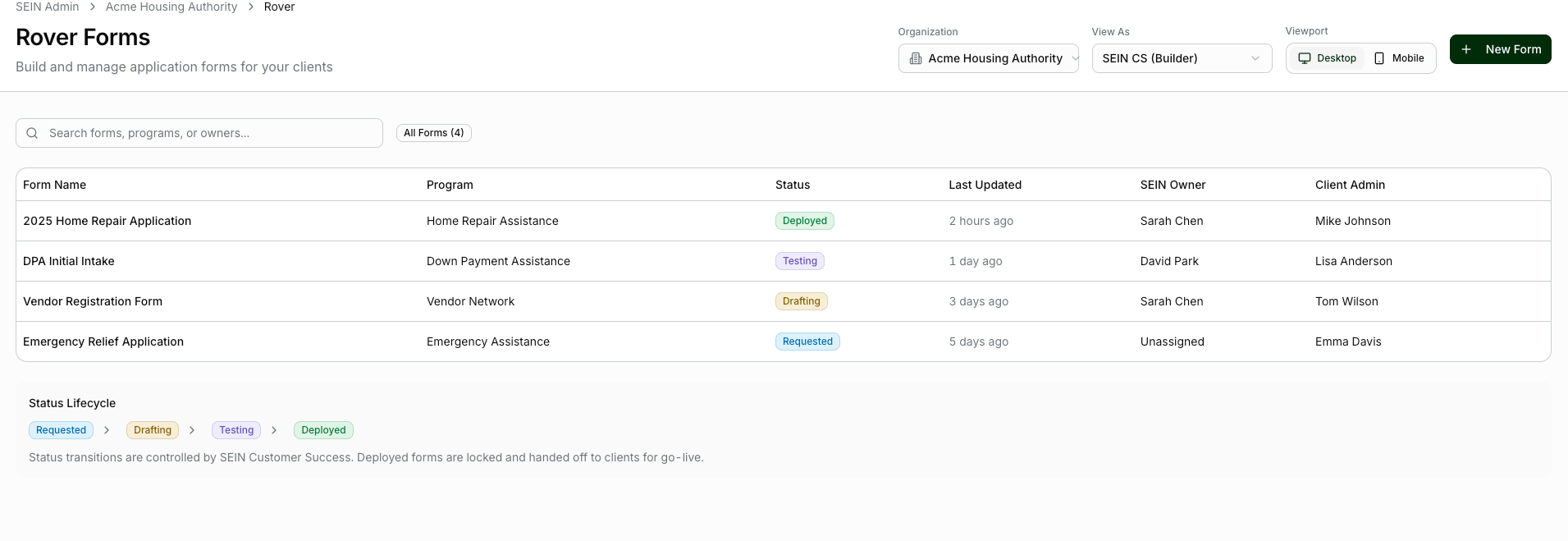
Government programs involve applicants, developers, service providers, reviewers, and approvals. Rover can structure that work so teams know what has been submitted, what is missing, and what decision comes next.
Use Case: Housing program and partner evaluation
Outcome to pursue: Make program and partner decisions with clear owners.
Sherpa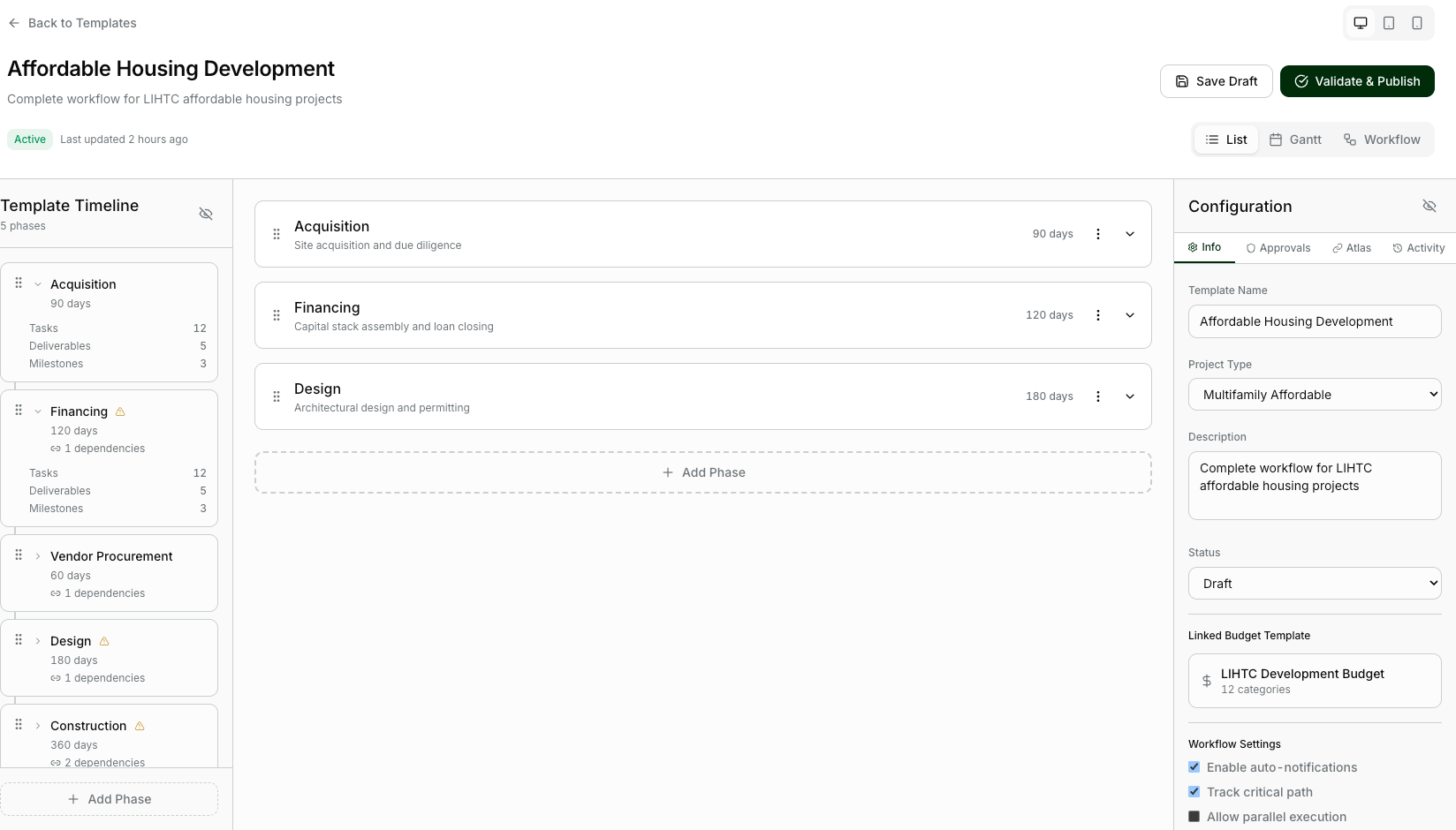
Once work is authorized, Sherpa helps teams coordinate the tasks, milestones, documentation, and handoffs needed to complete it. Departments can see responsibilities and exceptions without rebuilding the status story for each meeting.
Use Case: Approved program delivery
Outcome to pursue: Follow approved work with visible responsibilities and an accessible history.
Atlas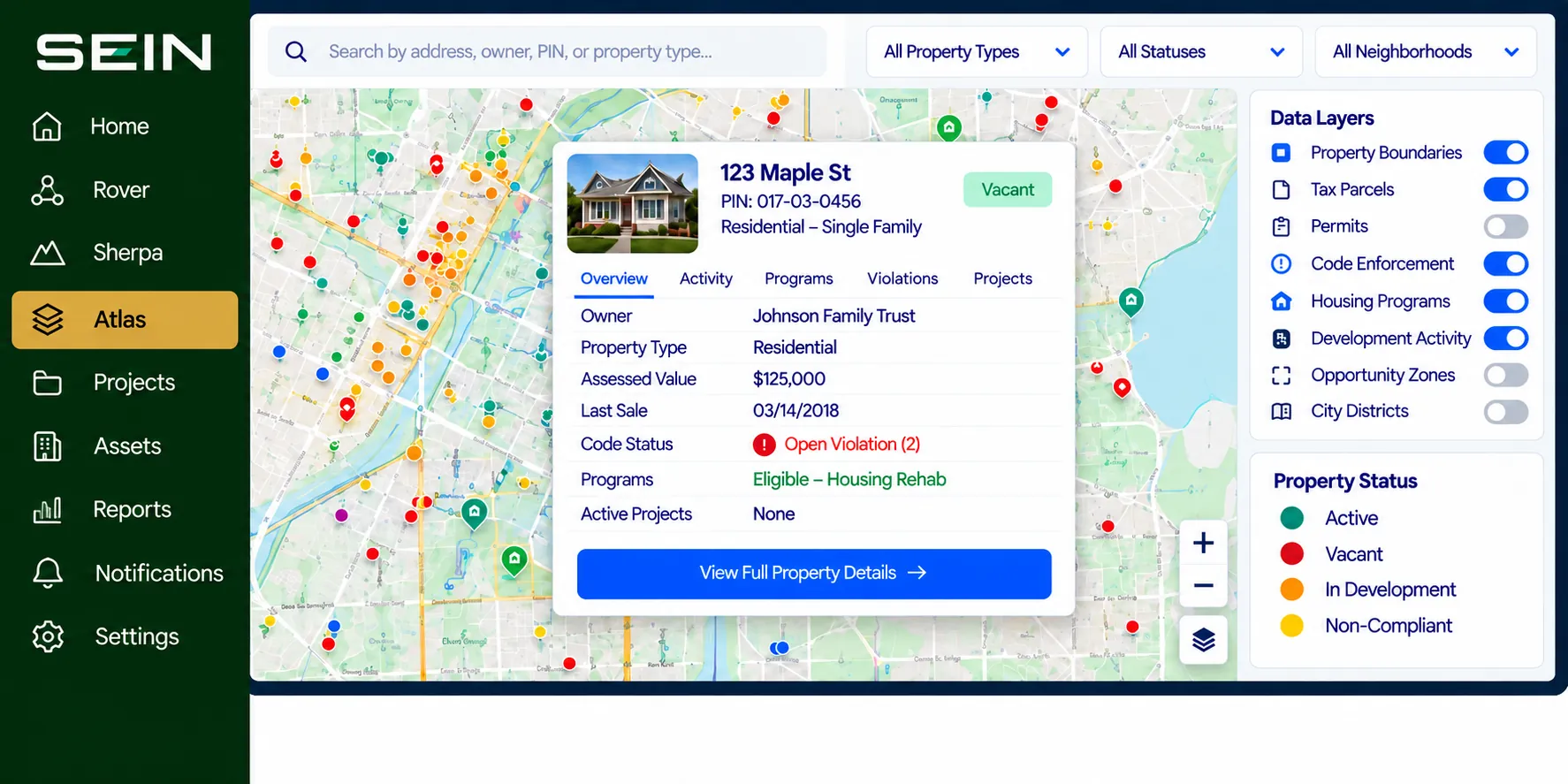
Bring relevant property records and activity into one place so staff can explore a parcel, look across a neighborhood, and identify where a decision or intervention may be needed.
Use Case: Cross-department property review
Outcome to pursue: Answer property questions with shared departmental context.
Explore how your team could use SEIN to address these challenges. Workflows, data sources, and success measures are defined around your operation.
The Challenge: A council member asks why a vacant property still has unresolved code complaints. Ownership, taxes, and departmental actions sit in separate records.
How SEIN helps: Atlas brings available parcel, ownership, tax, and code context together. Sherpa assigns follow-up to the responsible departments and tracks dependencies and decisions.
What better looks like: A clearer response to leadership, with the evidence, next owner, and outstanding work in view.
The Challenge: A housing application stalls because one document is missing and staff cannot tell who should follow up.
How SEIN helps: Rover keeps the application requirements, review stage, and decision owner together. Once approved work begins, Sherpa follows delivery and inspections while Atlas retains the property context.
What better looks like: Staff can explain the delay and assign the next action without rebuilding the application history.
The Challenge: A redevelopment proposal is approved, but the promised schedule and conditions remain in the selection file.
How SEIN helps: Rover organizes proposals, evaluation criteria, and the selection record. Sherpa carries the agreed commitments into assigned milestones and review checkpoints.
What better looks like: The team can connect why a partner was selected with what that partner is responsible for delivering.
The Challenge: Teams receive competing requests to intervene in vacant properties without a consistent view of the underlying issues.
How SEIN helps: Atlas organizes available vacancy, ownership, tax, and code information. Staff identify records requiring verification and document the reasons for prioritizing outreach or further review.
What better looks like: A shared basis for discussing priorities and directing staff attention.
The Challenge: Approved storefront improvements move at different speeds, while required documents arrive through separate conversations.
How SEIN helps: Rover records eligibility, application requirements, and approval. Sherpa follows agreed work, inspections, and closeout documents with an owner for each outstanding item.
What better looks like: Program staff can distinguish work awaiting a decision from work awaiting delivery or documentation.
The Challenge: Code, public works, finance, and housing each hold part of a property issue, and one team’s delay can stall the others.
How SEIN helps: Sherpa organizes tasks, dependencies, and responsible parties around the shared property context in Atlas. Teams record updates and escalate exceptions through the agreed workflow.
What better looks like: Everyone can see the current status and the action needed to move the issue forward.
Help departments answer property questions with less searching, keep approvals moving, and give leaders a dependable view of the work.
These are potential evaluation measures, not reported customer results. Data connections, workflows, and scope are confirmed with each organization.
Connect property use, condition priorities, and active projects to identify reuse opportunities and focus limited capital where it matters most.
Start with the decision or workflow your team needs to improve. Connect the right records, assign clear responsibilities, and measure whether the new process helps the work move forward.
Tell us where work gets stuck. We’ll explore where SEIN could help.